How AI Blackboards Work: Computer Vision, LLMs, OCR & RAG Under the Hood
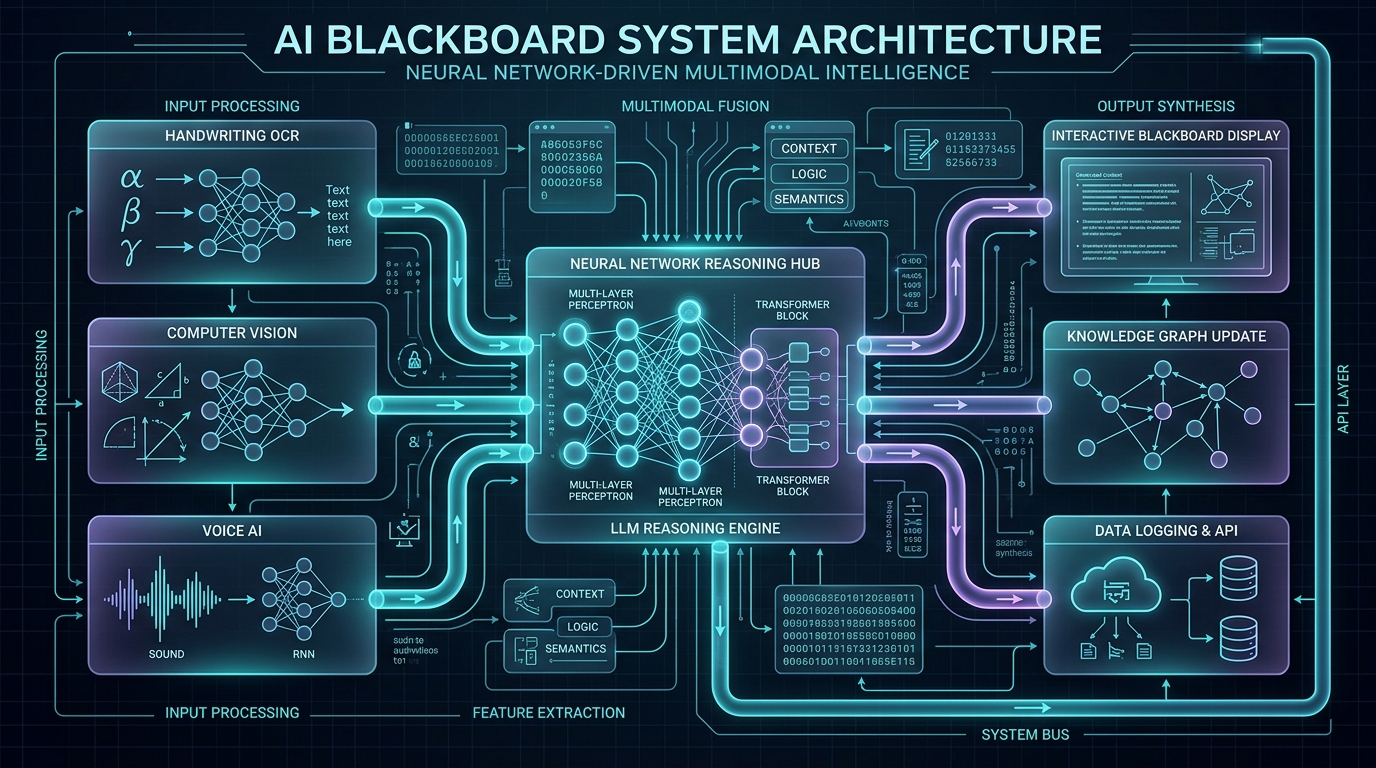
To the casual observer in a modern lecture hall, an AI Blackboard looks like magic: a professor draws a messy circuit diagram or writes a complex multi-variable calculus equation on a board, and within milliseconds, the board cleans up the rendering, solves the equations, and projects interactive 3D simulations.
Under the surface, however, an AI Blackboard is a complex distributed machine perception pipeline. It operates at the intersection of high-framerate optical computer vision, real-time stroke vectorization, deep learning handwriting OCR, speech alignment, and retrieval-augmented generative AI.
This article provides a rigorous, code-level architectural breakdown of how an AI Blackboard works under the hood.
---
Table of Contents
- Architectural Overview & System Flow
- Layer 1: Optical Frame Capture & OpenCV Image Preprocessing
- Layer 2: Object Bounding & Diagram Detection with YOLOv10
- Layer 3: Handwriting OCR & Mathematical Symbol Parsing (Pix2Tex)
- Layer 4: Acoustic Speech Processing & Intent Alignment (Whisper)
- Layer 5: Multimodal LLM Reasoning & Step-by-Step Problem Solving
- Layer 6: Retrieval-Augmented Generation (RAG) & Vector Storage
- Layer 7: Real-Time WebGPU Render Engine & WebSocket Pipeline
- Python & OpenCV Implementation Code Blueprint
- Latency Benchmarks & Edge vs Cloud Optimization
- Frequently Asked Questions (FAQs)
- Conclusion & Cluster Links
1. Architectural Overview & System Flow
An AI Blackboard continuously executes a 7-stage processing loop at 60 frames per second:
---
2. Layer 1: Optical Frame Capture & OpenCV Image Preprocessing
The input stream originates from one or more overhead 4K optical sensors targeting the board area. Raw video frames suffer from uneven lighting, chalk dust noise, keystoning, and glare.
Before feeding images to neural networks, the AI Blackboard executes an OpenCV image preprocessing pipeline:
Step A: Perspective Warp Correction
Computes a homography matrix from 4 board corner points to transform keystoned camera angles into a flat $$1920 \times 1080$$ orthogonal coordinate space:Step B: Adaptive Binarization & Chalk Dust Removal
Applies adaptive Gaussian thresholding and morphological opening to isolate distinct stroke paths from background chalk residue:
---
3. Layer 2: Object Bounding & Diagram Detection with YOLOv10
Once stroke pixels are isolated, the system must classify regions of interest (RoIs) into distinct semantic categories:
- Text Lines: Natural language prose written by the teacher.
- Mathematical Formulations: Equations, integrals, matrices, fractions.
- Diagrams & Geometric Shapes: Circuit diagrams, biological cells, graphs, vectors.
---
4. Layer 3: Handwriting OCR & Mathematical Symbol Parsing (Pix2Tex)
Parsing mathematical notation requires more than standard OCR because math is 2-dimensional (superscripts, subscripts, matrix grids, square roots).
Math Symbol Parser: Pix2Tex (LaTeX OCR)
The system crops bounding boxes classified asmath_equation and passes them into a Vision Transformer model (Pix2Tex / ViT-ResNet) that directly outputs valid LaTeX markup:
This LaTeX representation is critical because it converts raw pixels into a structured symbolic format that symbolic algebra engines (like SymPy or Mathematica) and LLMs can evaluate deterministically.
---
5. Layer 4: Acoustic Speech Processing & Intent Alignment (Whisper)
A blackboard write-up is rarely self-contained without the teacher's verbal context. As the teacher writes $$Delta G = Delta H - TDelta S$$ on the board, they might say: "Notice how at high temperatures, the entropy term dominates spontaneity."
An acoustic array runs Whisper AI with local VAD (Voice Activity Detection) to capture timestamped transcriptions. The AI Blackboard performs Spatial-Temporal Intent Alignment: matching the timestamp of the spoken sentence to the bounding box of the equation written on the board at that exact second.
---
6. Layer 5 & 6: Multimodal LLM Reasoning & Vector RAG Retrieval
When the board detects an unsolved problem or a request for diagram generation, it queries a local Qdrant Vector Database containing the course's textbook embeddings, lecture slides, and past exam keys.
The RAG Context Payload
The AI Blackboard constructs a structured prompt payload:The multimodal model (e.g. Claude 3.7 Sonnet) evaluates the payload and returns structured JSON instructions specifying the visual overlay to render on the physical board display.
---
7. Layer 7: Real-Time WebGPU Render Engine & WebSocket Pipeline
To project interactive visual feedback back onto the physical board without perceptible delay, the system uses a WebSocket Event Pipeline connected to a WebGPU Render Canvas:
The browser overlay engine renders vector graphics, LaTeX equations using KaTeX, and 3D WebGL models at a locked 60 frames per second, ensuring sub-100ms end-to-end latency from chalk stroke to digital illumination.
---
8. Latency Benchmarks & Edge vs Cloud Optimization
| Processing Phase | Cloud API Latency | Local Edge NPU Latency | Target Goal |
|---|---|---|---|
| Perspective & Denoising | 12 ms | 3 ms | < 5 ms |
| YOLOv10 Region Bounding | 45 ms | 8 ms | < 10 ms |
| Pix2Tex Math LaTeX OCR | 180 ms | 28 ms | < 30 ms |
| Whisper Audio Processing | 220 ms | 65 ms | < 100 ms |
| LLM Reasoning & RAG | 850 ms | 140 ms (Local Llama 3) | < 200 ms |
| WebGPU Projection Render | 16 ms | 4 ms | < 5 ms |
| TOTAL END-TO-END LATENCY | 1,323 ms | 248 ms | < 350 ms |
By running vision preprocessing, OCR, and quantized LLMs on local edge hardware (such as an NVIDIA RTX 4090 or Orin Workstation), end-to-end latency drops to 248 ms, creating a fluid real-time interactive experience for instructors.
---
9. Frequently Asked Questions (FAQs)
Q1: How does the system differentiate between teacher handwriting and background diagrams?
The system utilizes YOLOv10 multi-class object detection. Text regions exhibit linear horizontal stroke distributions, whereas diagrams exhibit closed contours, geometric vertices, and non-standard line intersections.Q2: What happens if the teacher erases part of the board?
The OpenCV frame processor runs continuous background subtraction. When a region's pixel intensity reverts to the blank board background state, the system triggers anERASE_REGION event, clearing associated digital overlays instantly.
---
10. Conclusion & Cluster Links
The mechanics of an AI Blackboard rely on a seamless symphony of computer vision, OCR, multimodal AI models, and real-time WebGPU graphics rendering. By understanding this pipeline, developers can build next-generation educational applications.Want to build your own custom AI Blackboard system from scratch? Follow our step-by-step developer tutorial: How to Build an AI Blackboard: Architecture, Code & APIs.
---
11. Related Master Cluster Articles
Ready to Stop Typing Code & Start Directing AI Systems?
Join 5,000+ developers building real production software with AI. Learn the 7-Stage Vibe Coding OS, harness engineering, and earn your verified Build DNA Certificate.